Smart Cabling Installations...
...just a marketing term or is there more to
it?
Well let's look into it more then!
Smart Wiring is the affordable way to wire
your home to make the most out of your cabling life, both now and
in the future.Smart Wiring is the standard in home wiring system
that lets you combine phone & fax lines, pay TV cabling, audio,
video, computer and Internet, intelligent lighting, security, home
automation, and much more. All at the one time and it gives the
flexibility to re-arrange your cabling's role in the future
without expensive re-wiring costs.
|
It's true, the term Smart Wiring is a marketing term but
don't be fooled, it is also what it says it is 'as
advertised' so to speak. It is a structured sensible
approach to cabling your home from the ground up. So,
if you're building a new home or renovating an old one or
you are planning to build an apartment complex then you
should speak with us....we know all about Smart Wiring,
which is why many happy owners and builders have used our
services in the past. |

|
Smart Wiring is best installed when
you're building or renovating and can be tailored to suit
your living and work requirements. It's also a smart
investment, adding approximately 1% in costs when building a
home but future proofing it for rapid technological changes.
* We do not represent ourselves
as regsitered with Smartwired Home. Use of the logo is
purely for illustation purposes |
|
Who's at the door? Why not use an
Intercom then |
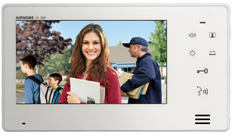 |
We use
Aiphone and
X2 systems for our intercom installations. Aiphone
products range from simple do-it-yourself door answering units to
sophisticated video entry security systems, complex
microprocessor-based commercial systems, and luxury
condo/apartment security/communication systems. They are unrivaled
in design simplicity, technical excellence and reliability. X2 systems and home based units capabale of 4 indoor stations, 2 outdoor stations and 2 CCTV camera integration. |
|
With over 30 standard systems, and additional manufacturing by
special order, we can create a system for virtually any intercom
application. |
Fibre Optic / Velocity Cabling / Opticomm
/ NBN
NBN Wiring In The Home
We can install your internal cabling for new Fibre to the Home
Estates. This can include the pre-wiring for the entry cables for
both Telstra Velocity Estates and NBN provided Estates.
Currently we
work in 7 key areas of Adelaide covering
FTTH or Fibre to the Home.
These are
Bluestone Mt. Barker,
Alexandrina Cove,
Wakefield Waters,
Blakes Crossing,
Lochiel Park,
Springwood
Gawler East and
Lightsview
Northgate. These areas deliver TV, Foxtel, Telephone and Internet
to each home via an underground
Fibre Optic cable from the street.
Pre-wiring your home for the basic fibre optic delivery typically
costs between $500 and $1000.
Opticomm Estates
We can install your home cabling in your house at any of the
Opticomm Estates in SA - our current works include Lightsview
Estate, Lochiel Park, Springwood and Blakes Crossing in Adelaide.
Velocity Estates
We can install your home cabling in your house at any of the
Telstra
Velocity Estates in SA - our current areas include Bluestone Mt
Barker, Alexandrina Cove and Wakefield Waters.
NBN Estates
We have recently started work in new NBN devlopments around
Adelaide, these include
St. Claire
Woodville and
Almond Grove
Munno Para.
|
|